
音视频技术社群关键帧的音视频开发圈的一位群友提了一个做播放器 SDK 性能优化都要遇到的一个问题:
“在对播放器进行性能埋点时,如何准确统计出每次播放的总的播放时长(能排除用户主动暂停/切后台等无效时间)以及卡顿时长,从而准确统计播放卡顿率?“
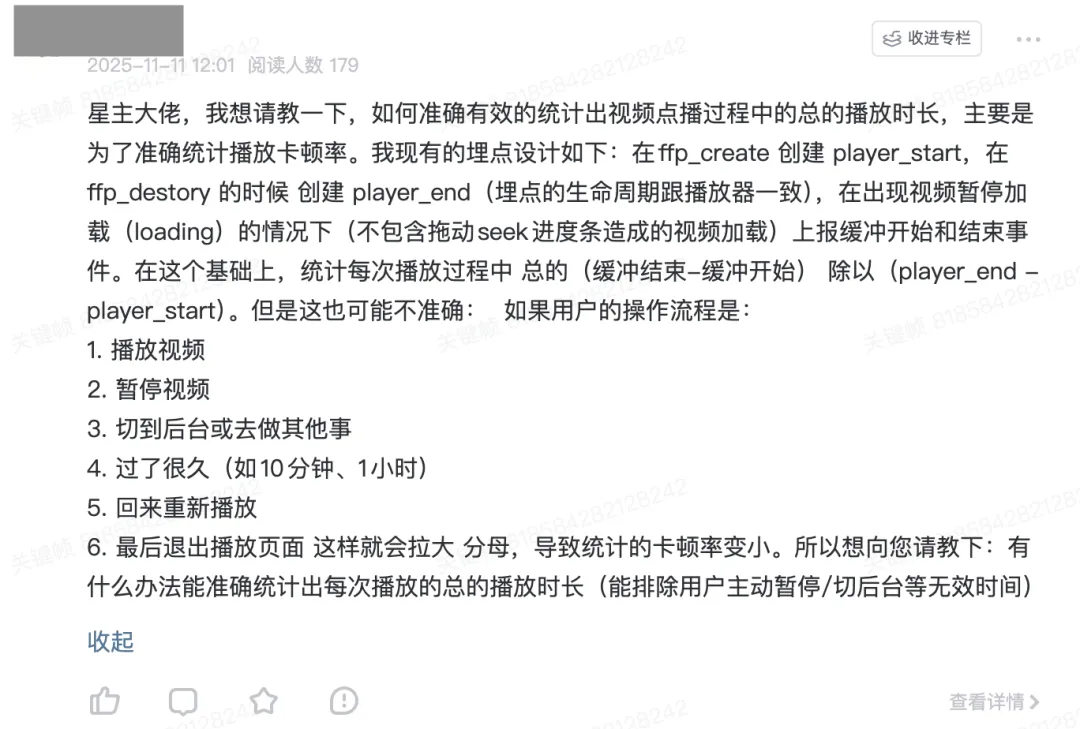

这里,我们就来讨论一下这个问题。
这个事情说起来很简单,但是做起来很麻烦。
总播放时长的概念很简单:
有效播放时间 = 所有(播放暂停事件时间 - 播放开始事件时间)的总和 + 最后一次播放开始到播放结束的时间(如果没有暂停事件直接结束的话)
或者
有效播放时长 = 总播放会话时间 - (暂停时间 + 后台时间 + 所有缓冲时间 + seek 时间)
但是由于播放过程的事件很多,所以做起来就很麻烦,你需要定义播放过程中可能出现的各种事件,然后在这些事件触发时统计其中真正播放的时间。
1、事件类型定义
- 播放器生命周期
- player_start: 播放器创建
- player_end: 播放器销毁
- 播放状态
- play_start: 开始播放(首次播放或恢复播放)
- play_pause: 用户主动暂停
- play_resume: 从暂停恢复播放
- play_complete: 播放完成
- 缓冲状态
- buffering_start: 缓冲开始
- buffering_end: 缓冲结束
- Seek 操作
- seek_start: 开始拖动进度条
- seek_end: 拖动完成
- 应用状态
- app_background: 应用进入后台
- app_foreground: 应用回到前台
2、基于事件和状态来埋点
下面是基于事件和状态来埋点的伪代码:
class PlaybackAnalytics {
  constructor() {
    // 时间记录
    this.sessionStartTime = null;
    this.lastPlayStartTime = null;
    this.totalValidPlayTime = 0;

    // 状态标志
    this.isPlaying = false;
    this.isBuffering = false;
    this.isSeeking = false;
    this.isBackground = false;
    this.isPausedByUser = false;

    // 统计累计时间
    this.totalBufferingTime = 0;
    this.totalSeekBufferingTime = 0;
    this.totalNormalBufferingTime = 0;
    this.currentBufferingStart = null;
  }

  // 播放器创建
onPlayerStart() {
    this.sessionStartTime = Date.now();
    this.lastPlayStartTime = Date.now();
    this.isPlaying = true;
  }

  // 开始播放/恢复播放
onPlayStart() {
    const now = Date.now();

    // 如果之前是暂停状态,累加播放时长
    if (this.isPausedByUser && this.lastPlayStartTime) {
      this.totalValidPlayTime += now - this.lastPlayStartTime;
    }

    this.lastPlayStartTime = now;
    this.isPlaying = true;
    this.isPausedByUser = false;
  }

  // 用户主动暂停
onPlayPause() {
    if (this.isPlaying && this.lastPlayStartTime) {
      this.totalValidPlayTime += Date.now() - this.lastPlayStartTime;
      this.lastPlayStartTime = null;
    }
    this.isPlaying = false;
    this.isPausedByUser = true;
  }
完整的代码请来星球查看👇

3、典型场景处理逻辑
场景 1:正常播放 → Seek → 缓冲 → 恢复播放
播放中 → seek_start → buffering_start → buffering_end → play_start
     ↓           ↓             ↓              ↓           ↓
  计时中     暂停计时     暂停计时       记录缓冲时间   重新开始计时
场景 2:播放 → 用户暂停 → Seek → 恢复播放
播放中 → play_pause → seek_start → seek_end → play_start
     ↓       ↓           ↓           ↓          ↓
  计时中   暂停计时     无操作       无操作     重新开始计时
场景 3:播放 → 切后台 → 回前台 → 继续播放
播放中 → app_background → app_foreground → play_start
     ↓         ↓               ↓             ↓
  计时中     暂停计时         无操作       重新开始计时
4、卡顿率计算逻辑
这里要注意区分 seek 缓冲时长:
// 正确的卡顿率计算(排除 seek 缓冲)
const correctStutteringRate = totalNormalBufferingTime / totalValidPlayTime;

// 包含 seek 的总体缓冲率
const totalBufferingRate = totalBufferingTime / totalValidPlayTime;
5、数据上报结构
你可以向后台上报这些数据:
{
  session_id: "xxx",
  video_id: "xxx",

  // 时间统计
  total_session_time: 3600000,    // 总会话时长
  valid_play_time: 1800000,       // 有效播放时长
  user_pause_time: 1200000,       // 用户暂停时长
  background_time: 600000,        // 后台时长

  // 缓冲统计
  total_buffering_time: 120000,   // 总缓冲时长
  seek_buffering_time: 60000,     // Seek 缓冲时长
  normal_buffering_time: 60000,   // 正常卡顿时长

  // 质量指标
  stuttering_rate: 0.033,         // 卡顿率 (3.3%)
  total_buffering_rate: 0.067,    // 总缓冲率 (6.7%)
  play_efficiency: 0.5,           // 播放效率 (50%)

  // 操作统计
  seek_count: 5,                  // Seek 次数
  pause_count: 3                  // 暂停次数
}
6、实施要点
- 状态完整性:确保所有状态转换都有对应的事件
- 时序处理:处理事件可能乱序到达的情况
- 异常恢复:处理应用崩溃、网络异常等场景
- 数据验证:验证
valid_play_time + user_pause_time + background_time + total_buffering_time ≈ total_session_time
这个方案能够准确区分用户主动操作和真实卡顿,提供精确的播放质量统计数据。
版权声明:本文内容转自互联网,本文观点仅代表作者本人。本站仅提供信息存储空间服务,所有权归原作者所有。如发现本站有涉嫌抄袭侵权/违法违规的内容, 请发送邮件至1393616908@qq.com 举报,一经查实,本站将立刻删除。