
蚂蚁 inclusionAI 发布开源统一图像生成与编辑模型 LLaDA-Image,提供 50 步 Base 和 4 步蒸馏 Turbo 两类 checkpoint,均有 BF16 与 FP8 版本。
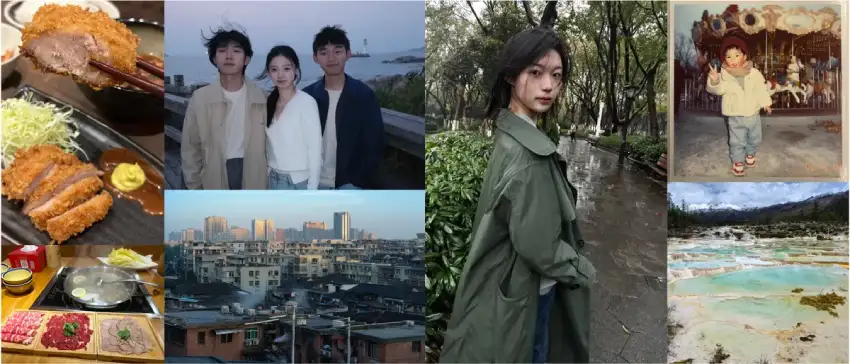

简介
LLaDA-Image 是一个具有竞争力的 6B 参数开源统一图像生成与编辑模型系列,包含两个版本:
- LLaDA-Image:50 步采样的 Base 模型,用于高质量文生图(text-to-image)与指令引导编辑;
- LLaDA-Image-Turbo:4 步采样的蒸馏模型,用于快速生成与编辑。
两种变体均支持实用的文生图、VQ 条件生成、参考图编辑,以及中英文文字渲染。
本仓库提供 LLaDA-Image 模型系列的权重(Checkpoints)与基于 Diffusers 的推理代码。
核心亮点
- 统一生成与编辑:单个权重即可同时支持文生图与”保持参考图特征 + 指令引导编辑”,无需单独的编辑骨干网络。
- 统一扩散架构:Backbone 与 DiT 均为扩散模型,在统一框架中训练。
- 逼真的图像生成:LLaDA-Image 生成的图像视觉细节丰富、光照自然、构图连贯。
- 纯图像预训练建立视觉先验:论文通过纯图像预训练 + 中期训练(mid-training)先建立视觉先验,再引入成对语言监督与生成—编辑联合训练。
- 蒸馏模型带来高效推理:LLaDA-Image-Turbo 采用 Twin-DMD 蒸馏技术,仅需 2–4 步采样即可快速完成生成与编辑。
- Qwen-Image-Bench SOTA:LLaDA-Image 综合得分登顶,英文 53.53、中文 53.38。

模型列表(Model Zoo)
| 模型 | 说明 | 采样步数 | Hugging Face(权重) |
| LLaDA-Image | 高保真文生图与指令引导编辑的 Base 模型 | 50 | BF16: inclusionAI/LLaDA-Image FP8: inclusionAI/LLaDA-Image-FP8 |
| LLaDA-Image-Turbo | 用于快速生成与编辑的蒸馏模型 | 4 | BF16: inclusionAI/LLaDA-Image-Turbo FP8: inclusionAI/LLaDA-Image-Turbo-FP8 |
快速上手
已在 Python 3.11、PyTorch 2.8、Transformers 4.57.6 与 Diffusers 0.39.0 环境下验证。
1. 创建环境
git clone https://github.com/inclusionAI/LLaDA-Image.git
cd LLaDA-Image

conda create -n llada-image python=3.11 -y
conda activate llada-image

pip install -r requirements.txt
2. 运行推理
Pipeline 接受一个 prompt;进行图像编辑时,额外传入可选参考图(reference image)。
LLaDA-Image(Base)
使用 Base 权重可获得高保真生成与编辑效果,推荐采样配置为 50 步。
import torch

from src import LLaDAImagePipeline

# Load the pipeline. The model is downloaded from Hugging Face on first use.
pipe = LLaDAImagePipeline.from_pretrained(
    "inclusionAI/LLaDA-Image",
    torch_dtype=torch.bfloat16,
    device="cuda",
)

# Generate an image.
prompt = (
    "A cinematic photograph of a red fox standing in fresh snow, "
    "soft winter light, detailed fur, shallow depth of field"
)
negative_prompt = ""

image = pipe(
    prompt=prompt,
    negative_prompt=negative_prompt,
    generation_mode="text",
    height=1024,
    width=1024,
    num_inference_steps=50,
    guidance_scale=5.0,
    generator=torch.Generator("cuda").manual_seed(42),
).images[0]

image.save("llada-image-base.png")
LLaDA-Image-Turbo
使用 Turbo 权重可快速生成与编辑,推荐采样配置为 4 步。
import torch

from src import LLaDAImagePipeline

# Load the distilled Turbo checkpoint.
pipe = LLaDAImagePipeline.from_pretrained(
    "inclusionAI/LLaDA-Image-Turbo",
    torch_dtype=torch.bfloat16,
    device="cuda",
)

prompt = "A quiet observatory above a sea of clouds at sunrise, golden light, wide-angle photograph"

image = pipe(
    prompt=prompt,
    generation_mode="text",
    height=1024,
    width=1024,
    num_inference_steps=4,
    guidance_scale=1.0,
    generator=torch.Generator("cuda").manual_seed(42),
).images[0]

image.save("llada-image-turbo.png")
生成模式(Generation modes)
两个权重均支持以下模式。文生图与 VQ 条件生成要求高、宽能被 16 整除;图像编辑要求尺寸能被 32 整除。
VQ 条件生成(VQ-conditioned generation) 使用 LLaDA2 模型根据 prompt 生成图像 VQ token,再由 SigVQ 嵌入后送入扩散模型。VQ 模式下请勿传入输入图像。
image = pipe(
    prompt="A quiet observatory above a sea of clouds at sunrise",
    generation_mode="vq",
    height=1024,
    width=1024,
    num_inference_steps=50,  # Use 4 for LLaDA-Image-Turbo.
    guidance_scale=5.0,  # Use 1.0 for few-step inference.
    generator=torch.Generator("cuda").manual_seed(42),
).images[0]
图像编辑(Image editing) 需要传入参考图:
from diffusers.utils import load_image

reference_image = load_image("/path/to/input.png")
image = pipe(
    prompt="Turn it into a watercolor painting",
    image=reference_image,
    generation_mode="editing",
    height=1024,
    width=1024,
    num_inference_steps=50,  # Use 4 for LLaDA-Image-Turbo.
    guidance_scale=5.0,  # Use 1.0 for few-step inference.
    generator=torch.Generator("cuda").manual_seed(43),
).images[0]
原文:https://huggingface.co/inclusionAI/LLaDA-Image-FP8
本文来自作者投稿,版权归原作者所有。如需转载,请注明出处:https://www.nxrte.com/jishu/71701.html


