
作为 WebRTC 开发者,我们已能高效地在全球范围内传输实时媒体数据。但通常情况下,最激动人心、最有价值的工作并非仅仅局限于媒体路由,而是要对其进行一些处理。挑战在于构建定制化的实时媒体处理工作流通常极为复杂,需要深厚的专业知识和巨大的工程投入。
正因如此,当我们看到 Juturna 的发布消息时倍感振奋,这款由 Janus WebRTC 服务器缔造者Meetecho 团队开发的全新开源库。
Juturna 是一款采用 Python 编写的轻量级实时数据处理库,正是为解决此类难题而生。选择 Python 是其最具战略意义的特性之一,因为它能够充分利用 Python 庞大而成熟的强大库生态系统,这些库涵盖人工智能、机器学习和计算机视觉等领域。
Juturna Python 库使开发人员能够轻松构建系统,这些系统可以提供实时转录(利用 OpenAI 的 Whisper 等工具)、使用 AI 进行内容审核,或创建自动生成摘要的“智能录音”。这种对尖端工具的即时访问具有颠覆性意义,赋予架构师极大的灵活性,使其能够在本地运行机器学习模型或与基于云的 AI 服务进行交互。
那么,Juturna 的独特之处在哪里?它又是如何运作的呢?Juturna 的核心在于它采用了一种截然不同的媒体处理方法。它无需编写庞大的单体应用或费力地处理复杂的框架,而是通过连接简单、可重用的组件来构建管道。让我们来详细了解一下这种管道模型是如何改变我们对实时媒体处理的固有认知的。
解构 Juturna:媒体管道
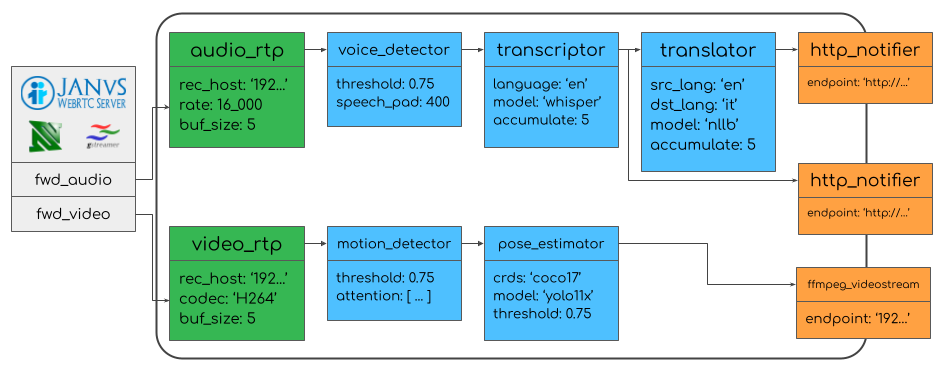

理解 Juturna 的最佳方式是将其想象成媒体管道。您可以定义一系列站点(称为节点),媒体文件将依次经过这些站点,每个站点执行特定的任务。
节点有三种基本类型:
- 源:这些是管道的输入。媒体内容就来自这里,例如来自 Janus 服务器的实时 RTP 流(或任何其他 RTP 流源)、FFmpeg 源,甚至是预先录制的文件。
- 处理节点:这些节点是整个操作的“大脑”,真正的魔法在这里发生。处理节点接收媒体文件,进行一些转换,并将结果传递给下游节点。这可以是任何事情,从检测视频中的运动到转录音频。
- 接收器:这是管道的输出。处理后的数据或媒体最终会到达这里,无论是发送到 HTTP Webhook、保存到文件,还是流式传输到另一个 RTP 端点。
最重要的是,整个管道及其所有节点都使用简单易读的 JSON 定义,这使得开发人员能够非常轻松地上手并快速实现原型设计。
但 Juturna 不仅易于使用,而且还具有高度可扩展性。您不必局限于开箱即用的节点。开发人员可以轻松地使用 Python 创建自定义的源节点、处理节点或接收器节点,以添加他们能想到的任何功能。
这种面向插件的架构意味着该平台可以不断发展并适应新技术和用例。
综合运用:简易运动探测器的实际应用
为了了解这些组件如何协同工作,我们来用 Juturna 绘制一个简单的运动检测流程图。我们的目标是分析实时视频流,并在检测到运动时向后端发送警报。整个项目可以在GitHub 上的 juturna-motion-detector 代码库中找到。
首先,我们会在一个simple_pipeline.json文件中定义我们的构建模块。这会告诉 Juturna 我们装配线上的不同“工位”以及它们的位置(设置为“ plugins“: [“ ./plugins“])。
/* simple_pipeline.json */
{
  "version": "0.1.0",
  "plugins": ["./plugins"],
  "pipeline": {
    "name": "motion_detection_pipeline",
    "id": "motion-001",
    "folder": "./running_pipelines",
    "nodes": [
      {
        "name": "video_source",
        "type": "source",
        "mark": "video_rtp_custom",
        "configuration": {
          "rec_host": "172.21.0.10",
          "rec_port": 8004,
          "payload_type": 96,
          "codec": "VP8",
          "width": 640,
          "height": 480
        }
      },
      {
        "name": "motion_detector",
        "type": "proc",
        "mark": "motion_detection",
        "configuration": {
          "threshold": 0.3,
          "min_area": 500,
          "sensitivity": 25
        }
      },
      {
        "name": "http_notifier",
        "type": "sink",
        "mark": "http_notifier_custom",
        "configuration": {
          "endpoint": "http://172.21.0.40/motion-detected",
          "timeout": 10,
          "content_type": "application/json"
        }
      }
    ],
    "links": [
      {
        "from": "video_source",
        "to": "motion_detector"
      },
      {
        "from": "motion_detector",
        "to": "http_notifier"
      }
    ]
  }
}接下来,我们可以创建自己的节点,或者利用现成的节点。例如,我们的motion_detection节点定义如下:
# plugins/nodes/proc/_motion_detection/motion_detection.py
import cv2
import numpy as np
from juturna.components import BaseNode, Message
from juturna.payloads import ImagePayload

class MotionDetection(BaseNode[ImagePayload, ImagePayload]):
    def __init__(self, threshold=0.3, min_area=500, sensitivity=25, **kwargs):
        super().__init__(**kwargs)
        self.threshold = threshold
        self.min_area = min_area
        self.sensitivity = sensitivity
        self.background_subtractor = cv2.createBackgroundSubtractorMOG2(
            detectShadows=True
        )
        self.frame_count = 0
        self.motion_count = 0
        self.logger.info(f'Motion detection node initialized: threshold={threshold},
 min_area={min_area}')

    def update(self, message: Message[ImagePayload]):
        self.frame_count += 1
        frame = message.payload.image

        ...

        # Convert to grayscale for motion detection
        gray = cv2.cvtColor(frame, cv2.COLOR_BGR2GRAY)

        # Apply background subtraction
        fg_mask = self.background_subtractor.apply(gray)

        # Find contours
        contours, _ = cv2.findContours(
            fg_mask, cv2.RETR_EXTERNAL, cv2.CHAIN_APPROX_SIMPLE
        )

        motion_detected = False
        motion_areas = []

        for contour in contours:
            area = cv2.contourArea(contour)
            if area > self.min_area:
                motion_detected = True
                x, y, w, h = cv2.boundingRect(contour)
                motion_areas.append({
                    'x': int(x), 'y': int(y),
                    'width': int(w), 'height': int(h),
                    'area': int(area)
                })

        ...

        # Only send notification when motion is detected
        if motion_detected:
            self.motion_count += 1
            self.logger.info(f"Motion detected in frame {self.frame_count}:
{len(motion_areas)} areas")

            new_payload = ImagePayload()
            new_payload.image = frame
            new_payload.width = frame.shape[1]
            new_payload.height = frame.shape[0]
            new_payload.depth = frame.shape[2]
            new_payload.pixel_format = 'BGR'
            new_payload.motion_detected = motion_detected
            new_payload.motion_areas = motion_areas

            to_send = Message(payload=new_payload)
            self.transmit(to_send)
        else:
            # Log occasionally when no motion
            if self.frame_count % 100 == 0:
                self.logger.debug(f"No motion in frame {self.frame_count}")
最后,我们加载管道并从脚本中运行它:
# main.py

#!/usr/bin/env python3
import time
import sys
import logging
import juturna as jt

def main():
    ...
    try:
        pipeline = jt.components.Pipeline.from_json('simple_pipeline.json')
        print(f"Starting pipeline: {pipeline.name}")

        pipeline.warmup()
        pipeline.start()
        print("Motion detection pipeline started")

        while True:
            time.sleep(30)

    except Exception as e:
        print(f"Pipeline error: {e}")
        sys.exit(1)
    except KeyboardInterrupt:
        print("Stopping pipeline...")
        pipeline.stop()
        pipeline.destroy()

if __name__ == "__main__":
    main()
就这样!
当 Juturna 采用此配置运行时,它会监听 RTP 视频流。一旦 Motion Detector 节点检测到移动,就会触发事件 Alert Webhookk,向后端 /motion-detected 发送通知。
这个简单的例子有力地证明了 Juturna 的核心价值:它处理所有复杂的底层逻辑,让开发人员专注于他们独特的处理逻辑。
Juturna 在 WebRTC 技术栈中的位置
Juturna 是一款功能强大的工具,您可以将其连接到您的媒体服务器(例如 Janus),从而为高级处理和分析提供出口。
Juturna 凭借其简洁性、灵活性以及 Python 生态系统的强大功能,是快速构建原型和在任何 WebRTC 应用中实现复杂功能的绝佳选择。由于它是开源且可扩展的,我们非常期待看到社区如何在此基础上构建下一代智能实时通信工具。
作者:Hector Zelaya
来源:https://webrtc.ventures/2025/10/juturna-python-library-real-time-media-processing/
本文来自作者投稿,版权归原作者所有。如需转载,请注明出处:https://www.nxrte.com/jishu/webrtc/62783.html

