
smart_rtpmd 是一款用于直播,录播性能卓越的服务器。如果您不理解,可以理解为和 nginx-rtmp, srs ,并与此功能类似,特点是性能卓越,跨平台,无依赖,部署和维护十分方便,解压既能运行。
smart_rtpmd 特点
- 性能是我们追求的目标,个人认为 smart_rtmpd 性能相对不错
- 部署简单,解压及运行,无需过度配置
- 兼容性特强,windows, linux, freebsd, arm64 主流系统,都满足运行条件
- 软件大小相对比较小,即使是嵌入式设备也能满足布署
- 支持 URL 重新机制,针对各种灵活的业务需求,提供支撑
- 支持 web 开发接口
- 支持集群,级联
支持哪些 OS
- Windows
- Linux ( Ubuntu, CentOS )
- FreeBSD
- ARM64
- Embedded system
其中 Linux, FreeBSD 版本 支持多线程 ( multithread ) 和协程 ( coroutines )。对于 docker 版本,直接拷贝 smart_rtmpd 到 docker 里面,直接运行即可。理论上即使是自定制 linux 操作系统都能正常运行 smart_rtmpd。
smart_rtpmd 优势
最大的优势就是极大的节约您的运营成本,维护成本,迁移成本,
- 软件布署极其简单,解压即可运行,无第三方库依赖,解决了部署繁琐问题,兼容性问题,以及后续升级维护兼容性的问题
- 高性能是 smart rtmpd 追求的目标,尽量降低硬件要求,挖据硬件性能,极大的节约运营成本
- 配置通用化,windows 平台的配置可以轻松拷贝到 linux, arm, freebsd 反之亦然,数据格式统一化,满足迁移需求
- 灵活的布署模式,支持单服务器,集群,级联等多种模式,满足各种业务需求 ( rewrite ),也满足大规模布署的需要
- 支持热插拔,最大限度的保证系统运营状态下,平滑升级或维护系统
- 支持鉴权接口与验证,满足灵活的业务需求
smart rtmpd 下载地址
- official:http://www.qiyicc.com/download/rtmpd.zip
- github:https://github.com/superconvert/smart_rtmpd
- gitee:https://gitee.com/superconvert/smart_rtmpd
smart rtmpd 支持哪些音视频编码和协议
支持音视频编解码
| 视频编解码 | 音频编解码 |
|---|---|
| h264, h265 | aac |
| h264, h265 | pcmu/pcma |
| vp8 ( webrtc ) | opus ( webrtc ) |
| h264 ( webrtc ) | pcmu/pcma ( webrtc ) |
支持流媒体协议
| client | server | protocol |
|---|---|---|
| srt | smart_rtmpd | rtmp[s], http[s]-flv, ws(s)-flv, http[s]-hls, https[s]-dash, rtsp[s], webrtc, srt |
| rtmp[s] | smart_rtmpd | rtmp[s], http[s]-flv, ws(s)-flv, http[s]-hls, https[s]-dash, rtsp[s], webrtc, srt |
| rtsp[s] | smart_rtmpd | rtmp[s], http[s]-flv, ws(s)-flv, http[s]-hls, https[s]-dash, rtsp[s], webrtc, srt |
怎么使用 smart rtmpd
最快部署
1. 下载软件包,解压 rtmpd.zip, 解压后得到 windows 的 smart_rtmpd 服务器
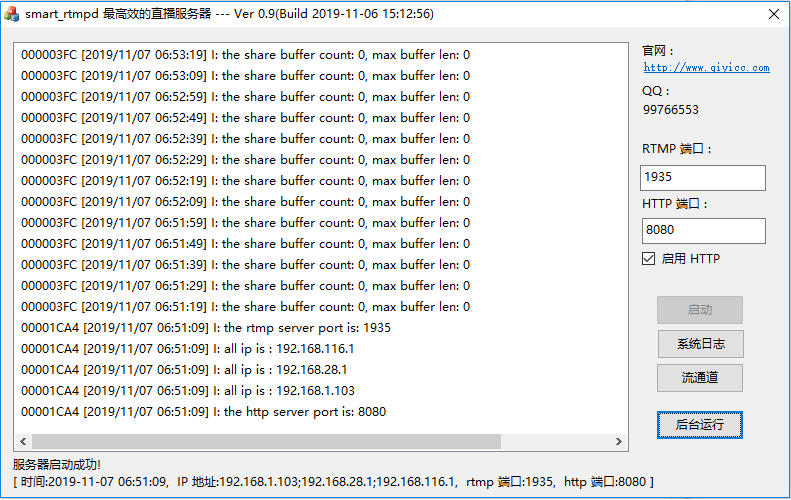
2. 运行 smart_rtmpd.exe 如下图,既表示成功

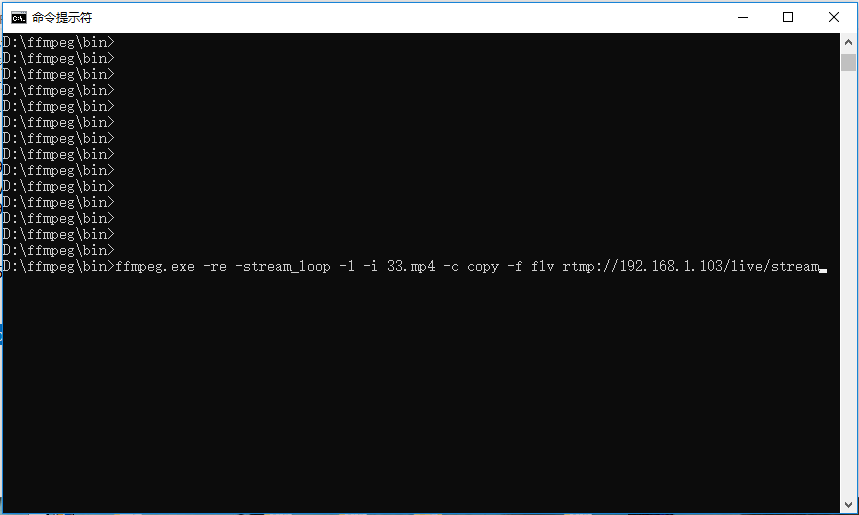
3. 推流验证,运行 ffmpeg.exe ( Windows下的 ffmpeg.exe 下载地址:https://github.com/BtbN/FFmpeg-Builds/releases )
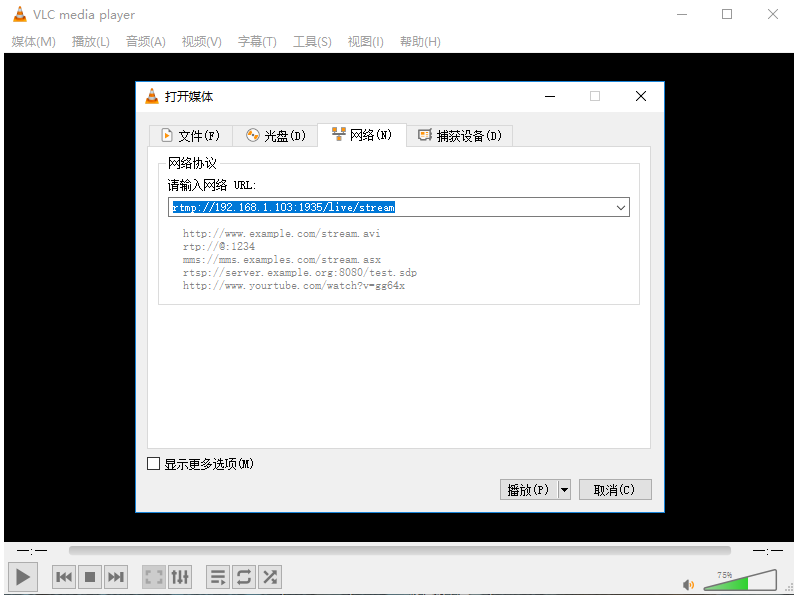
4. 播流验证
更多详细信息请访问:https://github.com/superconvert/smart_rtmpd
本文来自作者投稿,版权归原作者所有。如需转载,请注明出处:https://www.nxrte.com/jishu/yinshipin/61473.html


